
🎯 A Direct Answer from Boss Phúc on “Should I learn video editing or outsource it?”:
✅ The Answer: DEPENDS ON YOUR GOALS AND WHERE YOUR CHANNEL IS AT.
🔥 1. Early Stage – YOU MUST KNOW BASIC EDITING
If you’re just figuring out how to start a YouTube channel — especially with AI voice, storytelling, or analyzing top channels — you need to know basic editing.
Why? Because if you don’t understand pacing, sound design, image placement, or even thumbnail creation, outsourcing will lead to confusion and disappointment. You’ll waste money — and end up with bad videos.

💡 Example: If you’re telling a story about a lion attacking prey, but don’t time the climax properly or pick the right visuals, the emotional impact is gone.
🔥 2. Publishing Regularly – CONSIDER OUTSOURCING TECHNICAL TASKS
Once you’ve tested a few videos, found a solid format, and learned what your audience wants — then you’re on the right path of how to start a YouTube channel properly.
At this stage, you can hire editors to do the technical work (cutting clips, adding audio, visuals, etc.).
But you still need to supervise the content, script, thumbnail, and title yourself!
🛠 Tip: If you hire editors, send them templates, checklists, and your format — don’t assume they “get it”.
🔥 3. Building a System – YOU NEED A TEAM AND TASK SEPARATION
If you’re managing multiple channels or hitting millions of views, editing should be handled by a dedicated team.
But don’t become a “boss” who never learned editing — that’s a setup for chaos. You must know the basics to give solid feedback.

💬 Summary:
Starting out? ➤ MUST learn editing
Testing content? ➤ SHOULD know editing
Getting results? ➤ CAN outsource editing
💥 “If you want a good video, you must wash the rice yourself first.”
— Phúc BANI
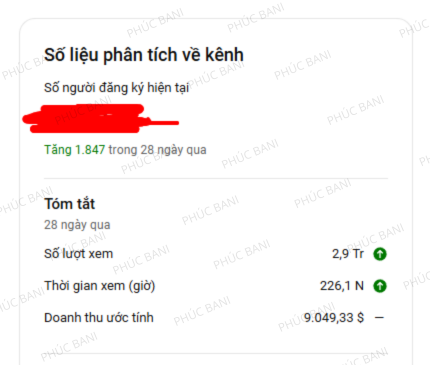
💥 BONUS: 7 CORE REMINDERS FOR VIDEO EDITING – so you don’t make dumb mistakes that destroy your chances:
🔥 1. Cut video based on EMOTION, not TIME
High-impact scenes should stay longer. Transitions must be sharp.
Don’t cut based on length — cut based on what the audience feels.
💡 Example: If a lioness carries her cub, hold that shot for emotion → then show the male lion for contrast.

🔥 2. Balance the Audio
Voice should always be clear. Music must stay in the background — never overpower voice.
If you want loud music, there should be no voice during that moment.
💡 Use CapCut or Premiere → separate audio tracks and adjust each level manually.
🔥 3. Choose visuals that MATCH the script
Random clips won’t work. YouTube’s AI will misjudge your content and kill your reach.
💡 If the script says “black bear swims across a river” — don’t use footage of a lake or elephants.
Use Google Lens to find accurate visuals.

🔥 4. Insert the thumbnail inside your video
Use your designed thumbnail as a scene transition — it builds trust and prevents copyright strikes.
🔥 5. Avoid cheesy transitions
No PowerPoint-style spinning or flashing.
Think “emotional storytelling”, not “visual circus”.

🔥 6. Align Thumbnail – Title – Content
These three must be in perfect harmony.
If even one is off, your viewers bounce and YouTube cuts off your growth.
🔥 7. The First 30 Seconds = DO OR DIE
Start with strong visuals, sharp audio, and bold voice-over.
A weak intro means 50% will leave instantly.
💬 Remember:
“Editing is the final emotional handshake with the audience. Mess it up — and they’ll walk away.”

If you’re asking yourself how to start a YouTube channel, this guide is your blueprint.
Now stop overthinking, start producing, and polish every second like it matters — because it does.


Để lại một bình luận