

Discover 7 essential tools for beginners to start a successful YouTube channel – from writing scripts, editing videos, designing thumbnails to analyzing viewer data. Starting YouTube is easier than you think!
I. Why You Need Tools When Starting on YouTube
Starting a YouTube channel from scratch may seem hard, but it becomes much simpler with the right tools. From content writing and AI voiceovers to thumbnails and analytics — there are free or affordable tools to help you begin efficiently and professionally.
“Having tools doesn’t make you great – but without them, you’ll move much slower.”
If you’re wondering how to make money on YouTube, the journey begins with optimizing your workflow using these tools.
II. 7 Must-Have YouTube Tools for Beginners
1. ChatGPT / Gemini – Super-Fast Scriptwriting
Even if writing isn’t your strong suit, you can still create quality content using AI assistance.
- ChatGPT: Expands storylines, creates smooth transitions, writes video descriptions or reply comments
- Gemini: Offers outlines and fresh script ideas
📌 Prompt example:
“Write me an 8-minute YouTube story script about a dog saving its owner from an accident.”
💡 Tip: AI gives you structure, but always add your personal emotion to avoid sounding robotic.

2. OpenVoice – Realistic Vietnamese AI Voiceover
Don’t want to show your face or record your voice? OpenVoice offers male/female, adult/kid voices with smooth, emotional delivery.
📌 50% discount link for Phúc BANI students:
👉 https://bit.ly/ttsopenvoice
If you’re working anonymously, this tool is a game changer in how to make money on YouTube without showing your face.
3. CapCut – Simple Yet Professional Video Editing
CapCut is perfect for non-editors. Just drag and drop to add text, music, effects.
- Available online or as desktop software
- Export in 1080p for free
- Auto-subtitles, transitions, and music
📌 Link: https://www.capcut.com

4. Canva – Design Thumbnails Quickly & Easily
Thumbnails are the first thing viewers notice → they must be bold, relevant, and clickable.
- Ready-made YouTube templates
- No Photoshop required
- Add icons, effects, motion backgrounds
📌 Link: https://www.canva.com
📌 Example:
For a “fail moments” video, use red backgrounds, large text, and funny expressions — Canva lets you create this in 5 minutes.
5. Remove.bg – One-Click Background Removal for Thumbnails
Instead of manually cutting backgrounds, let Remove.bg do it in seconds.
- Clean cutouts
- No graphic design skills needed
📌 Link: https://www.remove.bg
This helps your thumbnails look professional — another crucial step in how to make money on YouTube through increased clicks.

6. VidIQ / TubeBuddy – Boost SEO & Discoverability
To get your videos found and recommended, you need the right keywords.
- VidIQ: Suggests high-volume keywords
- TubeBuddy: Analyzes keyword competition
- Both: Help optimize titles, tags, and descriptions
📌 Links:
VidIQ: https://vidiq.com
TubeBuddy: https://www.tubebuddy.com
💡 Tip: Analyze competitors’ videos, find trending keywords → adapt them for your own titles. This is a core method in how to make money on YouTube by ranking in search results.
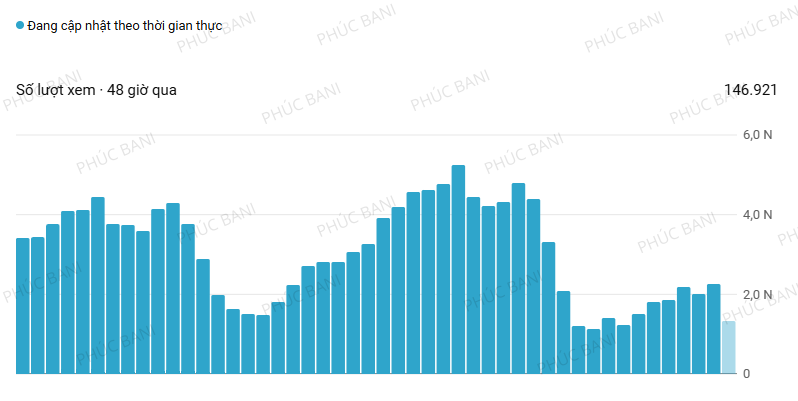
7. YouTube Studio – Track & Improve Your Channel
YouTube Studio is your channel’s control hub.
- See where views are coming from (search, suggested?)
- Find out when viewers stop watching
- Compare videos that are gaining traction
Using this regularly is key to growth — and crucial in understanding how to make money on YouTube consistently.

III. Tips for Using YouTube Tools Effectively
1. ChatGPT Helps – But You Still Need Creativity
Use AI scripts as a base. Add personal stories, emotions, punchlines.
2. Match AI Voice to Your Video Tone
Test pacing, tone, pauses. A sad story needs a calm, emotional voice.
3. A Beautiful Thumbnail Isn’t Always a Clickable One
Use contrast, emotions, and curiosity triggers. Avoid artistic photos; go for expressive shots.
4. SEO Tools Support — They Don’t Replace Strategy
TubeBuddy and VidIQ give suggestions. But you must choose niche keywords you understand.

5. Storytelling Still Matters
Even with easy tools like CapCut, you must:
- Build emotional highs
- Time effects with story beats
- Keep pacing smooth
6. Don’t Skip YouTube Studio
If you’re not analyzing your performance, you’re just guessing.
- Watch metrics like watch time, CTR, traffic source, retention
7. Tools Help – But Mindset Wins
“Tools don’t guarantee success. Strategy and consistency do.”
If you understand audience psychology + master 4–5 basic tools, you’re already ahead in learning how to make money on YouTube.

IV. Conclusion: Tools Are Important – But Strategy Matters More
You don’t need 20 expensive tools to grow.
All you need:
✅ 1 writing tool (ChatGPT)
✅ 1 editing tool (CapCut)
✅ 1 thumbnail tool (Canva + Remove.bg)
✅ 1 SEO tool (VidIQ or TubeBuddy)
✅ YouTube Studio to analyze performance
Combine them with storytelling, viewer empathy, and smart targeting — and you’ll unlock the real secret of how to make money on YouTube in 2025.



Để lại một bình luận